Javascript/JQuery
jQGrind - 생성
Back
2016. 9. 1. 14:35
jQGrid 생성
view.jsp 파일
1 2 3 4 5 6 7 8 9 10 11 12 13 14 15 16 17 18 19 20 21 22 23 24 25 26 | <%@ page language="java" contentType="text/html; charset=UTF-8" pageEncoding="UTF-8"%> <!DOCTYPE html PUBLIC "-//W3C//DTD HTML 4.01 Transitional//EN" "http://www.w3.org/TR/html4/loose.dtd"> <html> <head> <meta http-equiv="Content-Type" content="text/html; charset=UTF-8"> <title>Insert title here</title> <script src="https://ajax.googleapis.com/ajax/libs/jquery/1.12.4/jquery.min.js"></script> <script src="http://www.trirand.net/aspnetmvc/scripts/trirand/jquery.jqgrid.min.js"></script> <style type="text/css"> #grigList{border:1px solid #999;} </style> </head> <body> <!-- JQGrid가 삽입되는 Table --> <table id="grigList" class="scroll"> </table> <!-- 하단 네비게이터 페이징 부분 --> <div id="pager2"> </div> <script src="ex.js"></script> </body> </html> |
jqGrid.js
1 2 3 4 5 6 7 8 9 10 11 12 13 14 15 16 17 18 19 20 21 22 23 24 25 26 27 28 29 30 31 32 33 | $(document).ready(function(){ $("#grigList").jqGrid({ url:"data.json", //JSON 데이터 URL mtype:"POST", //POST 형식(get/post) height:250, //높이 250 width:500, //넓이 500 colNames:['번호','제목','작성자','등록일시','조회수'], //열명 colModel:[ //각 열에 대한 매핑 값 or 가로 길이,정렬,추가/수정 폼 구성 {name:'name', index:'name', width:'50', align:'center'}, // {name:'title', index:'title', width:'200', aling:'left',sortable:false,editable:true,editoptions:{size:50}}, {name:'writer', index:'writer', width:'100', aling:'center',sortable:false,editable:true,editoptions:{size:10}}, {name:'date', index:'date', width:'100', aling:'center',editable:true,eidtoptable:{size:50}}, {name:'hit',index:'hit',width:'50',align:"center",editable:false} ], rowNum:10, //한 페이지당 표시 될 목록수 rowList:[5,10,15], //한 페이지당 표시도리 목록 수 설정 (Select Box) pager:'#pager2', //페이지 네비게이터 영역 viewrecords:true, //페이지 네비게이터 맨 우측 영역 표시 여부 loadonce:true, autowidth:true, onSelectRow:function(id,status,e){alert('선택된 ROW');}, //행 선택시 이벤트 editurl:"data.jsp", //추가/수정/삭제 요청 URL caption:"JQGrid SAMPLE" // Gird 캡션명 }); //페이지 네비게이터 추가/수정/삭제/검색/리셋 설정 $("#gridList").jqGrid('navGrid','#pager2', {}, //options {height:280,reloadAfterSubmit:true},//edit options {height:280,reloadAfterSubmit:true},//add options {reloadAfterSubmit:true}, {} ); }); |
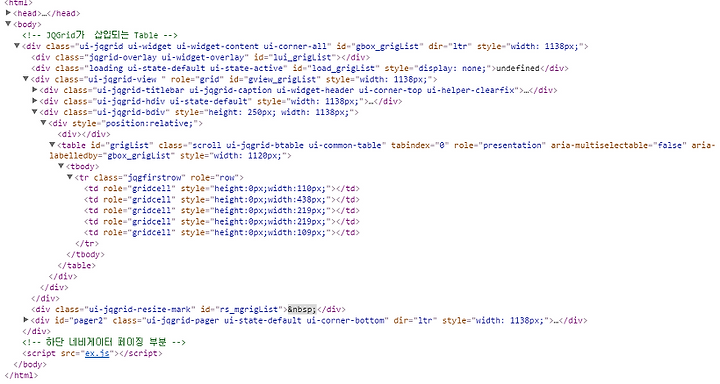
개발자 모드